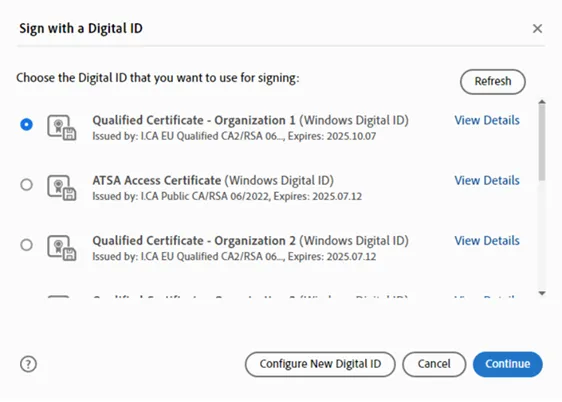
Personalization of the certificate selection menu in Adobe Acrobat
For users with multiple certificates, it can be a problem to immediately identify the appropriate type of certificate with which they currently need to sign the document.
The following guide describes how to set up unique identification of signing or sealing certificates in Adobe Acrobat.
Opening the relevant menu
Image
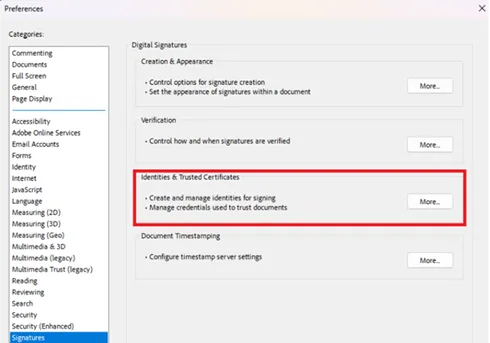
Path: Menu – Preferences – Signatures – Identities and Trusted Certificates
Selecting the certificate
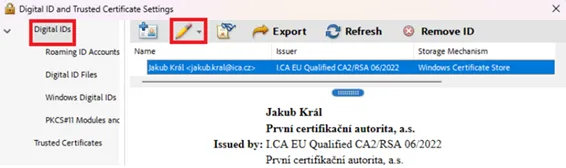
In the "Digital IDs" menu, select a certificate which you would like to change the identification for and click on the "pencil" icon in the top bar.
Image
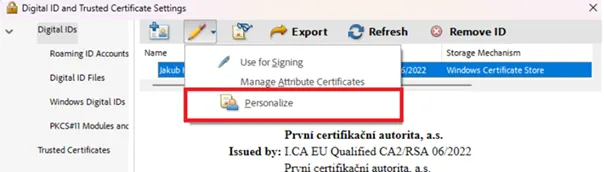
Selecting personalization
Image
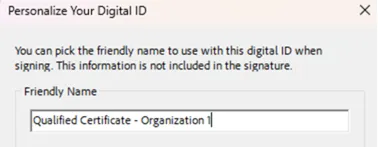
Choosing a descriptive name
Image
Final selection and appearance
Subsequently, when you sign or use certificates in Adobe, you will see the personalized Digital ID names in the certificate selection menu.
Image